


Best Trucking Management Software Tools For Owner-Operators (Save Time and Cut Costs!)
Trucking management software (TMS) is a platform that allows independent truckers or fleet managers to organize their operations. From dispatches and invoicing to maintenance records, and scheduling, and business reports to show the trucking business status, trucking management software allows truckers to manage their entire operation in one place.
Some trucking management software tools are more powerful than we expect. Even for small owner-operator trucking businesses, it’s not just about dispatches and invoices. For them, the best trucking management software tools improve profits by cutting repetitive data entry and providing the analysis needed for load selection.
Let’s look under the hood of TruckingOffice PRO trucking management software and discover tools that we are sure you need to know about – how to manage profitability, LTL load planning, and accounting integration features.
1. Use Revenue Per Mile and Expenses Per Mile to Make Better Load Decisions
Revenue per mile and cost per mile are the two most important numbers for load selection.
Cash flow delays and tight margins make every load decision critical. The need for quick answers to decide on a load matters when a trucker is looking at a load board.
Did you know that the same data that comes out of your invoices and expenses can also tell you how much money you’re making per mile? Or how much it costs you to run per mile?
Why is that important? Revenue per mile is how much money you’re making.
So the next time you go to the load board, you can make decisions about loads with your numbers in mind. It won’t just be about taking the highest-paying load – everyone’s trying for that one – but to get one that makes you the most profit. Because sometimes it’s not the obvious one. Sometimes it’s smarter to take 4 or 5 full loads a shorter distance than it is to go clear across the country for the big check.
When you know these numbers, you can decide which loads are worth it and which won’t make you a profit.
Knowing your expenses per mile – how much it costs you to drive – can be the difference between taking a load at a loss or deadheading extra miles for a better, more profitable load. But how will you know?
Use TruckingOffice’s Company Overview Report.
This report has been designed with truckers and owner-operators in mind. It does the calculations you need in a split second so you can make that decision about a load as fast as possible. Trucking management software tools need to help you make good decisions with the data you’ve already entered. You’ll worry less with TruckingOffice in your back pocket.
2. Use the LTL Load Planning Board for Organizing Multiple Loads
Organizing an LTL (less-than-truckload) trip requires a computer program designed to coordinate multiple load pick-ups, deliveries, and billing. Or a desk full of Post-It notes. We suggest the first. You’re less likely to drop one on the floor.
How anyone ever managed LTL shipping without a computer is beyond us. LTL shipping requires organizational skills that are on an epic level. Trying to put together a trip that makes sense, makes good time, and makes money requires some high-level analysis skills.
For LTL or hot-shot drivers who juggle multiple loads regularly, this is where most owner-operators see an immediate return on investment. Owner-operators who manage everything themselves will find their load development times significantly reduced.
TMS vs Spreadsheets
For hot-shot or LTL drivers, spreadsheets may seem like the tool of choice. Restructuring a load by shifting a row or column seems easier. But that doesn’t solve the tricky problem of how to bill mileage or to create a dispatch that optimizes routes.
The TruckingOffice Pro Load Planning Board is the best tool we know of to help you put those different loads into one coherent plan – and manage all of the invoicing and load tracking – all at the same time. With PC*Miler integrated, the best route can be created in seconds.
Many TruckingOffice Pro users don’t know about our load planning board. If you don’t haul LTL and don’t plan to, you probably just ignore it. When circumstances may make LTL shipping your best option, it’s good to know there’s a tool already in your toolbox to help you manage the ins and outs of a new trucking option.
3. Use QuickBooks Integration to Export Data for Accounting Support
Owner-operator trucking companies need a TMS to run their companies. But during tax season, extra accounting support may require a data transfer to QuickBooks or TurboTax.
When an accountant needs the data, it’s far quicker and smarter to export the numbers rather than pay someone to type them into QuickBooks. An entry error or confused details can lead to massive headaches and expensive overtime pay.
When this is the case, TruckingOffice PRO has an integration option with QuickBooks. You can export data to QuickBooks almost instantly and send it to your accountants.
You don’t need QuickBooks if you have TruckingOffice to run your trucking business. Our accounting module works from dispatch through invoicing (along with some nifty uses of BOL images to speed up the process) right through making sure you’ve got all the details correct so you’ll get paid faster.
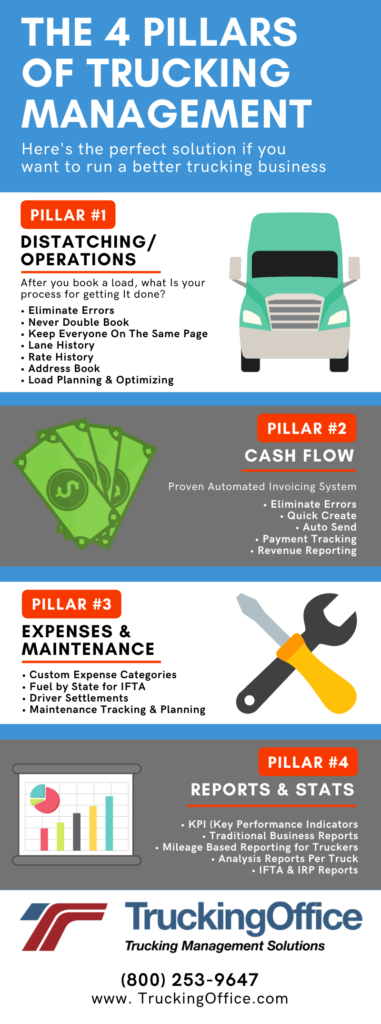
Trucking management software will save you money by pulling all the data your company needs into one platform. Eliminating the need for extra programs for IFTA or dispatching, TruckingOffice PRO reduces overhead, keeps paperwork organized, and lays the foundation for a successful trucking business. For the owner-operator, a TMS is the equalizer to the big transportation corporations.
How TruckingOffice Software Features Can Help You Reduce Trucking Costs
Technology makes it easier to be a trucker. Tasks that once took several hours to complete can now be finished in a matter of minutes. There’s no need to mess with complicated spreadsheet formulas or to reenter data into stand-alone task managers like IFTA calculators. With trucking business management software, drivers and managers can manage all aspects of running their business with just a few clicks.
What does trucking management software do?
- Manages dispatches and load planning
- Automates invoicing and billing
- Monitors maintenance records, scheduling, and compliance.
- Centralizes business data in one system.
- Produces reports to show revenue and cost per mile automatically with Trucker Stats™.
How does this translate to reducing trucking costs? Here are a few examples:
- Provide clear guidance based on cost per mile on load selection.
- Reduce fuel costs with optimized routing.
- Avoid compliance fines (IFTA filing or DOT audits/inspections).
- Prevent breakdowns with maintenance alerts.
- Improve dispatch efficiency.
The best TMS will lead to faster load decisions and fewer unprofitable miles.
If you’re an owner-operator who handles the driving and the back office or a small fleet manager looking for a TMS to reduce software costs, then there’s a great TMS waiting for you to take a look.
Learn More About Trucking Management Software Tools
Trucking is always a challenging business. That’s why you need the data to work for you, instead of you messing around with complicated numbers and formulas. Everything that TruckingOffice offers was designed with truckers in mind – by truckers. You need the right tools to be a success on the road – and TruckingOffice PRO provides them. That’s why it’s the best trucking software for owner-operators and small fleets.
Of course, there’s more to our TruckingOffice TMS system than we can possibly list here. Are you interested in learning more about how our TMS can reduce your costs? We’ll make it easy for you. Check out these customer reviews and then sign up for our free trial. You’ll be surprised at the many ways we can help you get organized and save money.

Content Updated June 2026


Recent Comments